
Want your workflow to spring into action the moment a call wraps up?
The Call Completed Starting action kicks off your workflow automatically whenever a call ends within Concierge Support.
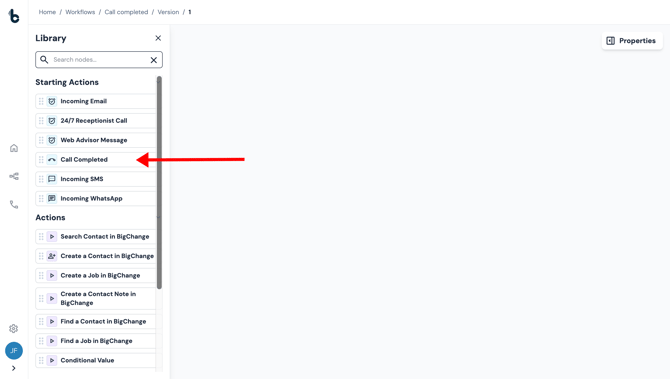
Configuration
There is currently no configuration required.
To set up the Call Completed Starting action, simply add the node to your workflow and define what happens next by adding and connecting the node to an Action node.
Outcomes
As with all Starting actions, the only outcome is Complete.
Default variables
The Call Completed Starting action provides several default variables that can be used later in your workflow:
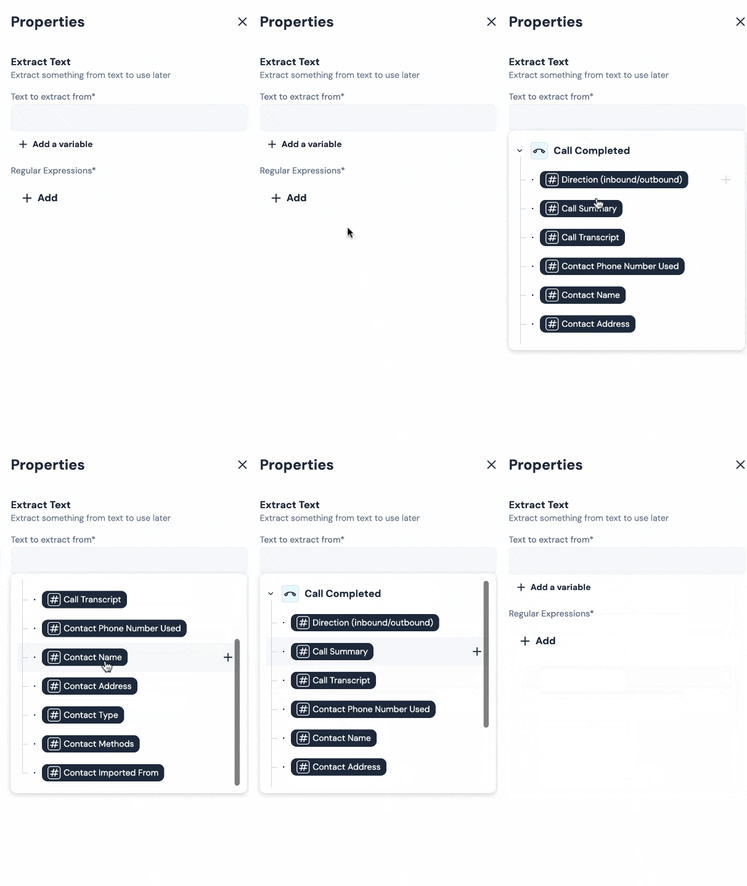
Direction (inbound/outbound) - Whether the call was received from the contact (inbound) or placed by your team (outbound).
Call Summary - An AI-generated short overview of the call’s main topic and outcome.
Call Transcript - An AI-generated text transcription of the full call conversation.
Contact Phone Number Used - The phone number used during the call (caller number for inbound, dialed number for outbound).
Contact Name - The name of the contact (if the contact is already stored in Build Concierge).
Contact Address - The contact’s address (if the contact is already stored in Build Concierge).
Contact Type - The type of contact (this will usually be a person but could be a business or some other segment type).
Contact Methods - Available contact methods (phone number, email address, number for SMS, number for WhatsApp).
Contact Imported From - The source the contact was imported from. This will not give a result if the contact was created in Build Concierge. However, if, for example, the contact comes from BigChange, this would show here.
These variables can be used to map the data into fields of later nodes.
Example use case: AI sentiment analysis and email summary
A common use case is to have AI analyze the call and provide certain outputs, such as sentiment and a summary.
To achieve this, simply connect the Call Completed starting action to an AI Prompt node to automatically analyze the call’s sentiment and create a summary. You can then use a Send Email action node to share the outputs with your team.
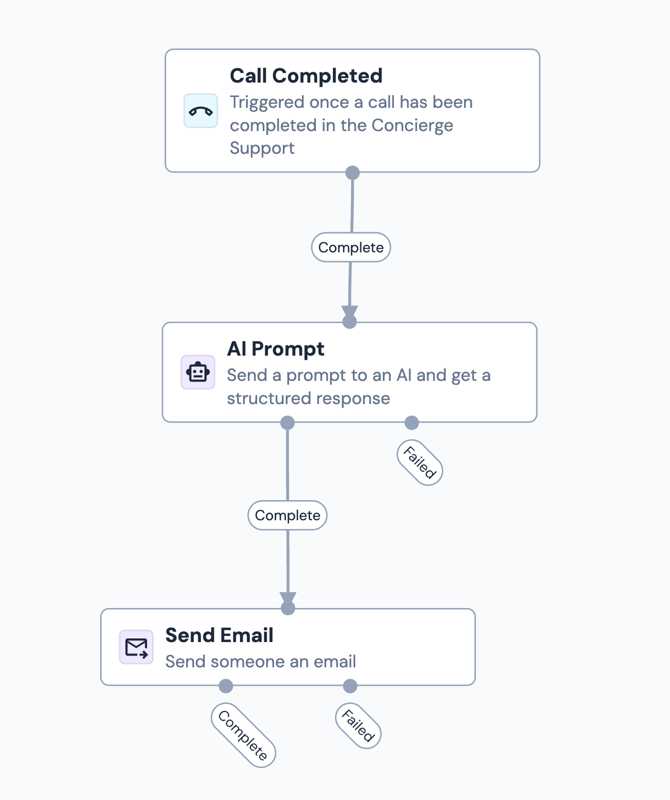
Here’s how to set it up:
- Add the Call Completed starting action to your workflow.
- Add an AI Prompt node and connect it to the Call Completed node.
- Configure the AI Prompt node with the specific prompt in the prompt field.
- Add the following as outputs:
- Sentiment
- Confidence
- Key indicators
- Summary
- Add and connect a Send Email action node.
- Configure it to send an email to your team with the AI output included in the body of the email.
- Save and activate your workflow.
💡 Tip
A good example of how to prompt for sentiment is using the following prompt:
You are an expert call analysis agent trained to evaluate the sentiment and tone of customer interactions. Your task is to analyze the transcript of a customer call and determine the overall sentiment of the customer toward the interaction.
You must:
1. Focus ONLY on the customer's sentiment (not the agent’s).
2. Consider tone, word choice, emotional cues, and conversation context.
3. Provide structured output that includes:
- Sentiment rating (Positive / Neutral / Negative)
- Confidence score (0–100)
- Key indicators (phrases, emotions, or moments that drove your assessment)
- Short summary (2–3 sentences) explaining the sentiment judgment.
If sentiment is unclear, lean toward "Neutral" and note why.
Base your analysis only on what is said in the transcript, not assumptions about unstated emotions or intentions.
Analyze the following call transcript for customer sentiment.
[Insert the call transcript here as a variable]
Other use cases
- Send a follow-up message or survey to a customer after a call including information that was taken during the call
- Update client records with the call outcome
- Notify team members when specific types of calls are completed