
Want to be automatically notified the moment something goes wrong in a workflow? Error Email Notifications let you send an automatic email whenever a workflow fails, without having to manually build Send Email nodes for every possible failure point.
Configuration
Error emails are configured at the workflow level, from the workflow configuration sidesheet:
- Open your workflow and click into the Workflow Configuration sidesheet.
- Toggle on Enable error emails.
- Once enabled, an Email addresses field will appear. Add one or more addresses, separated by commas.
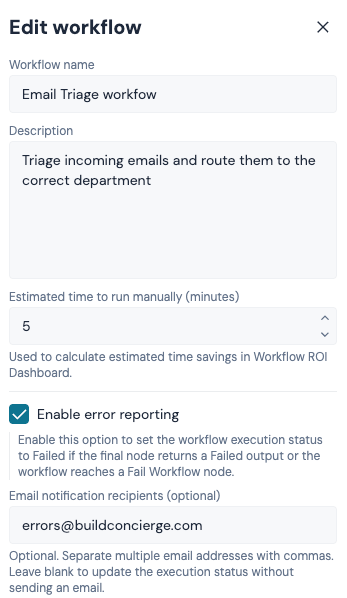
When this toggle is enabled, if the last action in a workflow run produces a failed outcome, an email is sent automatically to the addresses you've configured — no further setup required.
This also marks the workflow run as Failed in the execution log, so it's clear at a glance which runs need attention.
The Fail Workflow node
For more control over where in a workflow an error email should be triggered, add the Fail Workflow node.
- Drag the Fail Workflow node onto your canvas from the node panel.
- Connect it from any node in your workflow, at any point you want to treat as a failure.
- The node itself has no configuration and no outputs — it simply marks that point in the workflow as a failure.
If the workflow branch reaches a Fail Workflow node and Enable error emails is switched on for that workflow, an email is sent to the configured addresses, and the run is marked as Failed in the execution log.
💡 Tip: Use the Fail Workflow node when a failure happens partway through a workflow, rather than only at the very last action — for example, after a validation check, an API call that didn't return the expected result, or a manual escalation point.
Execution log status
Any run that reaches a failed outcome — whether that's the workflow's last action failing, or a Fail Workflow node being reached — is marked as Failed in the execution log. This makes it easy to filter and spot problem runs, even if you haven't got error emails enabled.
Outcomes
The Fail Workflow node has no outputs — it's an end point for that branch of the workflow.
Example uses
Some typical ways to use Error Email Notifications:
- Automatically let a user know a job booking failed, with a link the team can use to investigate straight away.
- Flag a failed BigChange sync partway through a workflow, before the workflow continues on to unrelated steps.
- Replace manually built Send Email nodes on every failure branch with a single toggle and a reusable Fail Workflow node.