
As your account builds up more and more workflows, particularly on shared accounts used for demos or sales, it's easy for the Workflows list to get cluttered with old, test, or one-off builds. Archiving lets you tidy up your workflow list without permanently deleting anything.
An archived workflow is hidden from your default list and can't be triggered, but it's never deleted, you can unarchive it at any point to edit or run it again.
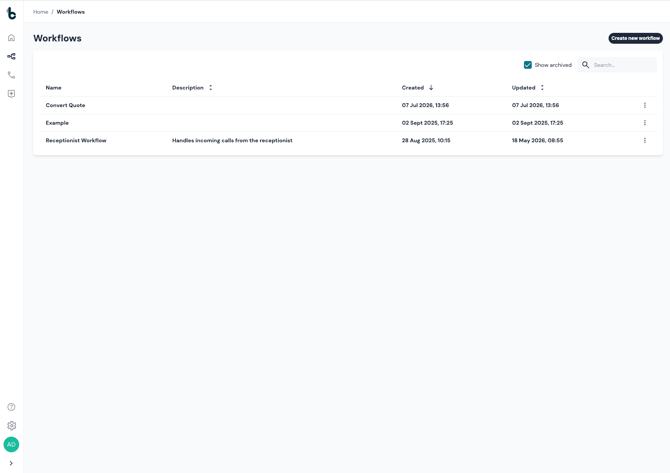
Archiving a workflow
To archive a workflow:
- From the Workflows list, find the workflow you want to archive.
- Click the kebab menu (⋮) at the end of the row.
- Select Archive.
- A confirmation modal will appear:
Archive workflow Archiving hides this workflow from the default list and stops it from running. You can unarchive it later to edit it again.
- Click Archive to confirm, or Cancel to back out.
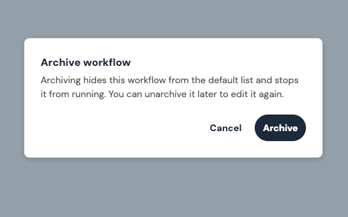
Once archived, the workflow disappears from your default Workflows list.
Viewing archived workflows
Archived workflows aren't shown in the list by default, but they're never far away:
- Tick Show archived, above the Workflows list.
- Archived workflows will now appear in the list alongside your active ones, marked with an Archived badge next to the workflow name.
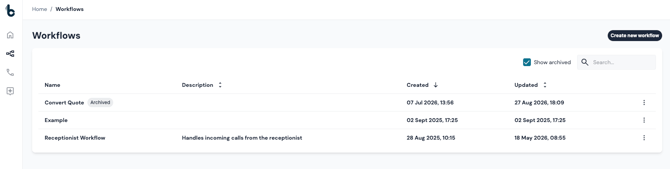
From here, you can open an archived workflow to review its configuration, but it can't be edited or triggered while archived.
Unarchiving a workflow
To bring a workflow back into active use:
- Tick Show archived to bring the workflow back into view.
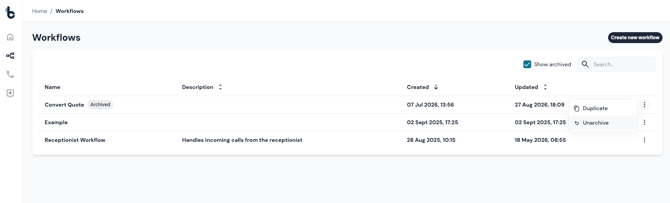
- Click the kebab menu (⋮) on the archived workflow's row.
- Select Unarchive.
The workflow immediately returns to an active state — the Archived badge is removed and it behaves as normal, whether or not Show archived remains ticked.
💡 Important notes
- Archived workflows cannot be triggered — incoming events, webhooks, or schedules that would normally start the workflow won't run while it's archived.
- Archived workflows can be viewed but not edited. To make changes, unarchive it first.
- Archiving does not delete the workflow or its run history — everything is preserved and fully restored on unarchiving.
- Archiving is reversible at any time, so it's a safe way to keep shared or demo accounts tidy without losing any build work.