
The Add Financial Line in BigChange action allows your workflow to automatically add a financial line to a Job or Sales Opportunity in your BigChange account.
It works by using data generated or extracted earlier in the workflow to create a financial line item, such as labour, materials, or costs, directly against a record in BigChange.
Automating this step removes the need for manual data entry, ensures financial data is applied consistently, and enables fully automated commercial workflows without requiring custom API configuration.
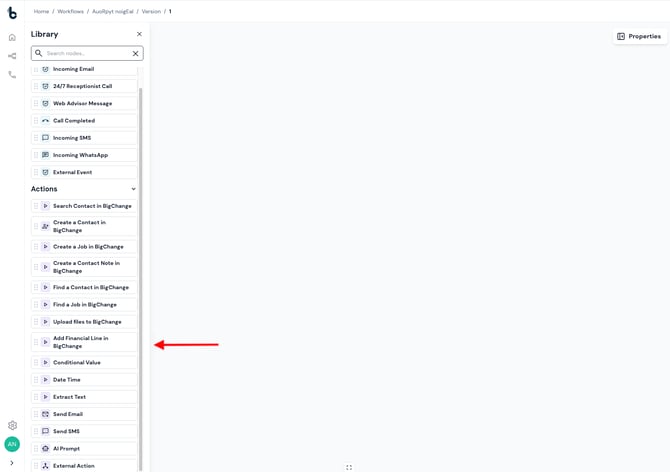
Configuration
To set up the Add Financial Line in BigChange action:
- Add the action to your workflow and connect it to a previous step in the workflow (a Starting action or Action node).
- Click the Add Financial Line in BigChange action to open the Properties panel.
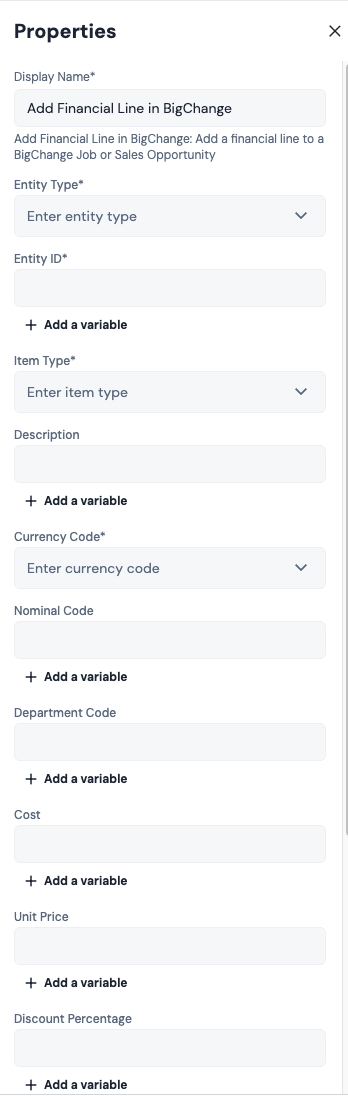
Mandatory Fields
Entity Type:
This field defines where the financial line will be added.
Available options:
- Job
- Sales Opportunity
Select the appropriate option based on your workflow.
Entity ID:
This field defines the specific record in BigChange that the financial line will be added to.
This is typically mapped from a previous node, such as:
- Job ID from a Create Job node
- Sales Opportunity ID from a previous step
Click + Add a variable and select the relevant ID.
⚠️ Note: The Entity ID must match a valid record in BigChange. If the ID is incorrect or missing, the upload will fail.
Item Type:
This field defines the type of financial line being added.
Available options:
- freetext
- predefined
- stock
- drivingplanned
- drivingactual
- workplanned
- workactual
- expense
Currency Code:
Defines the currency used for the financial line (e.g. GBP, USD).
Conditionally Required Fields
Predefined Item ID:
Required when Item Type is set to predefined.
This should match an existing predefined item in your BigChange account.
Description:
Required when Item Type is NOT set to predefined.
This is typically populated using data extracted earlier in the workflow, such as:
- Line item descriptions from emails
- AI-generated summaries
- Static values for standard charges
⚠️ Note: If Item Type is set to predefined, the Description field is ignored even if populated.
Optional fields
The following fields can be configured depending on your use case:
Nominal Code:
Used for financial categorisation within BigChange.
Department Code:
Used to assign the line to a specific department.
Cost:
The internal cost associated with the item.
Unit Price:
The price per unit charged.
Discount Percentage:
Applies a percentage discount to the line.
Discount Value:
Applies a fixed discount amount.
Quantity:
Defines how many units are being charged.
VAT Rate:
Defines the VAT percentage applied to the line.
Additional Fields (Job Only)
When Entity Type is set to Job, the following additional option is available:
Include Defaults
Enable this to apply any default financial settings configured in BigChange for the job.
Workflow tip
This action is most commonly used after:
- Creating a Job or Sales Opportunity
- Extracting pricing or line item data from emails or documents
For more advanced workflows, you can:
- Add multiple financial line nodes to build up a full quote or invoice
- Use conditional logic to apply different pricing based on job type or customer
Outcomes
Once the Add Financial Line in BigChange node runs, it will return one of two possible outcomes:
Complete – The financial line was successfully added. The workflow will continue to the next connected step, if at all.
Failed – The financial line could not be created, usually due to missing required fields or invalid values.
💡 Tip: To troubleshoot failures, connect the Failed branch to a Send Email node and include the Reason for Failure variable in the email body.
Default variables
The default variables available for this node depend on the outcome.
If the node completes:
- Financial Line ID – The unique identifier for the created financial line in BigChange
This can be used in later steps for tracking or further automation.
If the node fails:
- Reason for failure – A system-generated value explaining why the action failed
Important notes
The fields required for this action depend on the selected Item Type, so ensure your workflow logic accounts for this.
Numeric fields such as Quantity, Unit Price, and Discount should be validated in earlier steps where possible to avoid failures.
This action supports both Jobs and Sales Opportunities within a single node, simplifying workflow design and reducing duplication.